Replacing Crontabs with systemd Timers on a Home NAS
For years my storage box ran a handful of housekeeping jobs out of /etc/crontab: a monthly ZFS scrub, weekly long SMART self-tests, and a nightly script that trimmed stale camera upload staging folders. Everything worked right up until the weekend I shut the machine down during a thunderstorm, missed the Sunday 03:00 scrub window, and didn’t notice for six weeks because local mail delivery wasn’t wired up on that host.
Moving those four lines into systemd timers took twenty minutes and fixed three separate annoyances at once: missed runs after downtime, overlapping runs when disks are busy, and scattered logs.
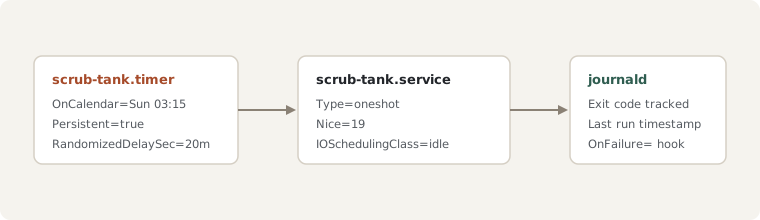
The two-unit pattern
Every scheduled task needs a .service unit describing what to run and a matching .timer unit describing when to wake it up. Here is the unit pair I use for scrubbing the main mirror pool:
# /etc/systemd/system/scrub-tank.service
[Unit]
Description=Run monthly scrub on ZFS pool tank
ConditionACPower=true

[Service]
Type=oneshot
Nice=19
IOSchedulingClass=idle
ExecStart=/usr/sbin/zpool scrub tank
# /etc/systemd/system/scrub-tank.timer
[Unit]
Description=Monthly schedule for ZFS pool scrub
[Timer]
OnCalendar=Sun *-*-01..07 03:15:00
Persistent=true
RandomizedDelaySec=20m
[Install]
WantedBy=timers.targetTwo directives do most of the heavy lifting here:
Persistent=truerecords the last trigger timestamp on disk under/var/lib/systemd/timers/. If the NAS is powered off on the first Sunday of the month, the scrub starts automatically shortly after the next boot instead of waiting another thirty days.IOSchedulingClass=idleensures background maintenance yields disk queues whenever another process reads media files or writes backups.
Testing calendar expressions before enabling
Calendar syntax is much easier to read than five-column cron lines, and you don’t have to guess whether your expression means the first Sunday or every Sunday:
systemd-analyze calendar --iterations=4 "Sun *-*-01..07 03:15:00"That prints the exact next four firing times in both local time and UTC, along with the human-readable delta from now. Once it looks right, enabling only touches the .timer unit—the .service stays static so it only runs when triggered or when started manually during testing:
sudo systemctl daemon-reload
sudo systemctl enable --now scrub-tank.timer
systemctl list-timers --all
Having LAST, NEXT, and PASSED in a single table (systemctl list-timers), plus full stdout and exit status under journalctl -u scrub-tank.service, has completely ended my habit of redirecting cron output into /var/log/custom-*.log files that nobody remembers to rotate.